
Calling all Racers! In the next update of Beach Buggy Racing 2, we are going to begin to change the way your BBR2 save games are secured and stored in the cloud.
This change will affect all BBR2 players, so please take a moment to read this entire post.
UPDATE: If you have the update and want instructions on migrating your account, please click here.
Overview
In the past, BBR2 let players secure their progress using an email address and password. In the next update, we're introducing a new sign-in system, using your system's game service login. The way you sign in will depend on what device you play on:
Apple Game Center for iPhone and iPad
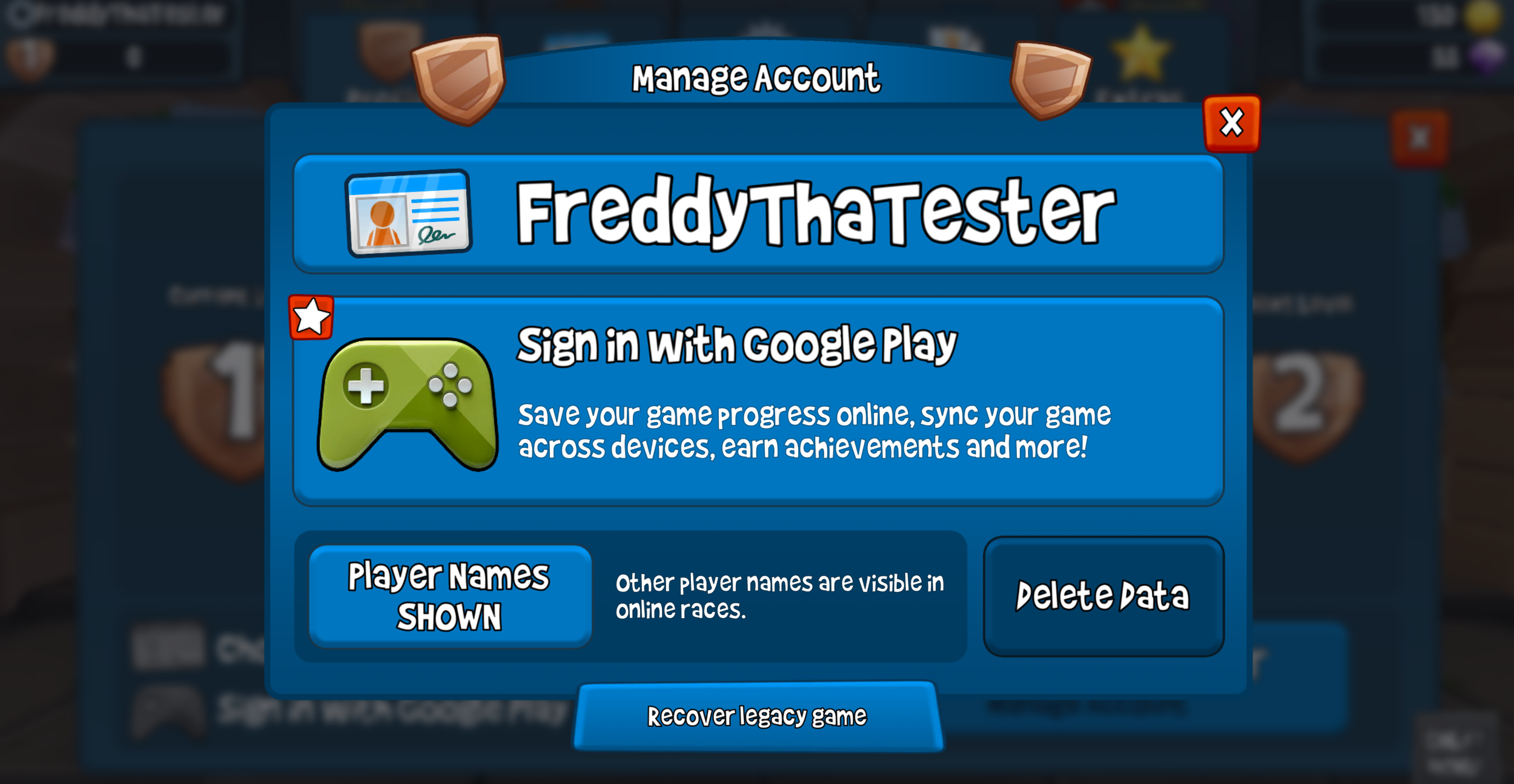
Google Play Games for Google-based Android phones and tablets
Login with Amazon for Fire Tablets (Note in the examples that follow, we mostly discuss Google and Apple, but the same will hold true for "Login with Amazon")
Changing from the current email system to Game Center, Google Play Games and Amazon sign-in will bring several major benefits to Beach Buggy Racing 2:
Stronger security and better privacy
Your save game will be protected by Apple/Google/Amazon sign-in, rather than a separate email/password pair.
Fair play
Game service authentication will reduce cheating, protecting the integrity of tournaments, and fairness in the game.
New game service features
This migration enables us to support new features such as Achievements. It will also allow you to engage with BBR2 in the Apple Games App and the Play Games App and new Sidekick.
Keeping your data safe is very important to us, so we are going to implement this transition slowly and carefully in three phases.
Let's take a look at how the migration is going to play out, and what you can expect.
Phase 1 - Migration optional for existing players
The first phase of our migration is planned for a late July update. During this phase, current players will have the option to migrate their existing BBR2 game to their preferred game services profile, while we continue to support the legacy email login.
This phase will continue for about 2-3 months to give everyone time to make the switch and get used to the new system.
Existing players with an email-secured BBR2 save game:
You will see an option on the Account Management screen to migrate your existing BBR2 save game to a Game Center (iOS), Google Play Games (Android) or Amazon (Kindle) profile. You can do this at any time, and you don't have to do it right away.
When you migrate, your BBR2 save game with your purchases and progress data will continue to be backed up to our game servers, just as it is now. The difference is you will no longer use your email address and password to sign in. Instead, when you install BBR2 on a new device, you can just log in with your game service profile and your BBR2 game will sync.
Important: Each game service profile can only have one BBR2 save game associated with it.
For most players with a single save game, this won't affect anything, you can just keep playing the way you normally do. But if you have multiple BBR2 saves, or if you play on two different operating systems (Android phone and iPad for example) you will need to assign each game to a different profile.
See the FAQ below for more information.
New Players:
If you are a brand new BBR2 player, or if you started playing recently and haven't secured your save game yet, you will simply follow the new system. You will sign in with the game service on your device and your game will be backed up to the cloud using that game service profile.
Starting with this Phase 1 update, it will no longer be possible to secure new save games with the legacy email/password sign-in system.
Phase 2 - Migration required for online play
Phase 2 is exactly the same as Phase 1, with one big difference:
Starting in Phase 2, we will require game service profiles to play online in tournaments and participate in challenge games. Legacy email account holders who have not migrated their save games to a game service will still be able to play the game normally and keep syncing across devices. They just won't be able to play online.
Requiring game service profiles for online play will help us enforce fairness in online competition and reduce cheating.
We expect the Phase 2 update to happen during the fall of 2026.
Phase 3 - Full migration
In Phase 3, we will end support for email-based sign-in entirely. All players will be required to switch over to the new game service profile system.
From this point on:
Email login will no longer work
If you chose not to migrate, your save game will switch back to "unsecured" status -- your game progress will be preserved and you'll still be able to play, but your game won't be backed up to the cloud
In some very limited cases, you will still be able to recover an old email-secured save game, but you will have to contact our support team to help you.
We will provide clear in-game messaging and ample notice before Phase 3 begins. We expect to transition to Phase 3 sometime around the end of the year (December 2026).
Thank you for helping us improve BBR2
We know account changes can be disruptive, so we’re approaching this carefully and in stages. This migration is a key step toward a more secure, more fair, and more feature-rich future for Beach Buggy Racing 2.
As Phase 1 rolls out, we’ll share in-game guidance and support resources to make sure the transition is smooth. As always, our community staff on Discord and our support team at support@vectorunit.com are available to help you out if you have any questions or problems.
Frequently asked questions
Why are you making this change?
The new system will be more secure than the old system, and will reduce cheating in tournaments. Adding game services also allows us to support achievements and other features.
Will I need to do this right away?
Not immediately. When Phase 1 starts, migration will be optional for existing email-secured save games, and we’ll keep that window open for a long time. We will continually update this post and our support FAQ online with the latest dates for each of the transition phases.
What happens if I don't migrate?
For existing players, in Phase 1, nothing changes — keep playing as usual. In Phase 2, you can still play and sync your save with your email account, but you won't be able to play online. In Phase 3, email login ends: your progress is preserved and playable, but it will no longer be backed up to the cloud unless you've linked a game service profile.
Can I still use my email/password for login after this starts?
During Phase 1, pre-existing email-secured save games will continue to work while you migrate. In Phase 2, you will still be able to sync your game, but you won't be able to play online. In Phase 3, email login will be retired.
I play on an Amazon Fire tablet. How does this work for me?
Same idea, just with Login with Amazon instead of Game Center or Google Play Games. You'll link your BBR2 save to your Amazon profile, and your game will back up to the cloud through that profile.
What if I have multiple BBR2 save games?
If you play with multiple BBR2 save games, you will need to associate each one with a unique game service profile. Each game service profile can only have one BBR2 save game attached to it. The old "Switch Accounts" button will go away.
If you only have one game service profile, you will need to pick a single save game to use with that profile. After you migrate your BBR2 game to the game service profile, you will play with that single save game going forward.
The "Switch Accounts" button will go away in BBR2. If you want to maintain multiple BBR2 save games, you will need to have multiple game service profiles on your device, one for each BBR2 save game. If you want to switch BBR2 save games, you have to exit BBR2, change game service profiles, and restart BBR2.
(Both Google Play Games and Game Center support multiple user profiles on a single device. See game service documentation for information on switching between profiles.)
Can I sync across two operating systems?
For existing players who currently play on both iOS and Google Play or Amazon, you will be able to secure your BBR2 save game with a unique service profile on each platform.
For new players we will initially only support a single platform. We plan to roll out cross-platform play for new players in a future update.
I got a new phone. How do I bring my save over?
Just sign in on the new device with the same game service profile you linked your save to, and your game will sync automatically. (Or, during Phase 1 and Phase 2, if you're still using email login, you can continue to use that to sync.)
What if I don’t currently use Game Center / Google Play Games?
Don't worry: signing up for Game Center or Google Play Games is simple. Just click the button in Beach Buggy Racing 2, and follow the prompts.
What if I make a mistake and accidentally link the wrong profile?
Don't worry! If you have multiple BBR2 save games, and you accidentally link the wrong save game to your game service profile, you can still recover. Just contact our support team, and we can unlink the profile for you so you can try it again.
Will this help reduce cheating?
That’s the goal. This change gives us a stronger authentication foundation and better tools to protect player save games and reduce abusive behavior.
What information do you share with Apple, Google, or Amazon?
Very little. We use these services only to confirm it's you. Your save game data is stored on our game servers. We don't receive your password, and we don't share your BBR2 data or personal info beyond what's needed to sign you in.
Does this cost anything?
Nope. Game Center, Google Play Games, and Login with Amazon are all free, and there's no charge to migrate.